
GoHighLevel contact actions for the post-webinar scramble
The hour after a live webinar is when setters work fastest and click most. GoHighLevel contact actions put your own quick tags, short forms and workflow buttons on every contact record, so "attended live, replay hot, book a call" is three taps instead of a dozen clicks. You set it up yourself in the editor.
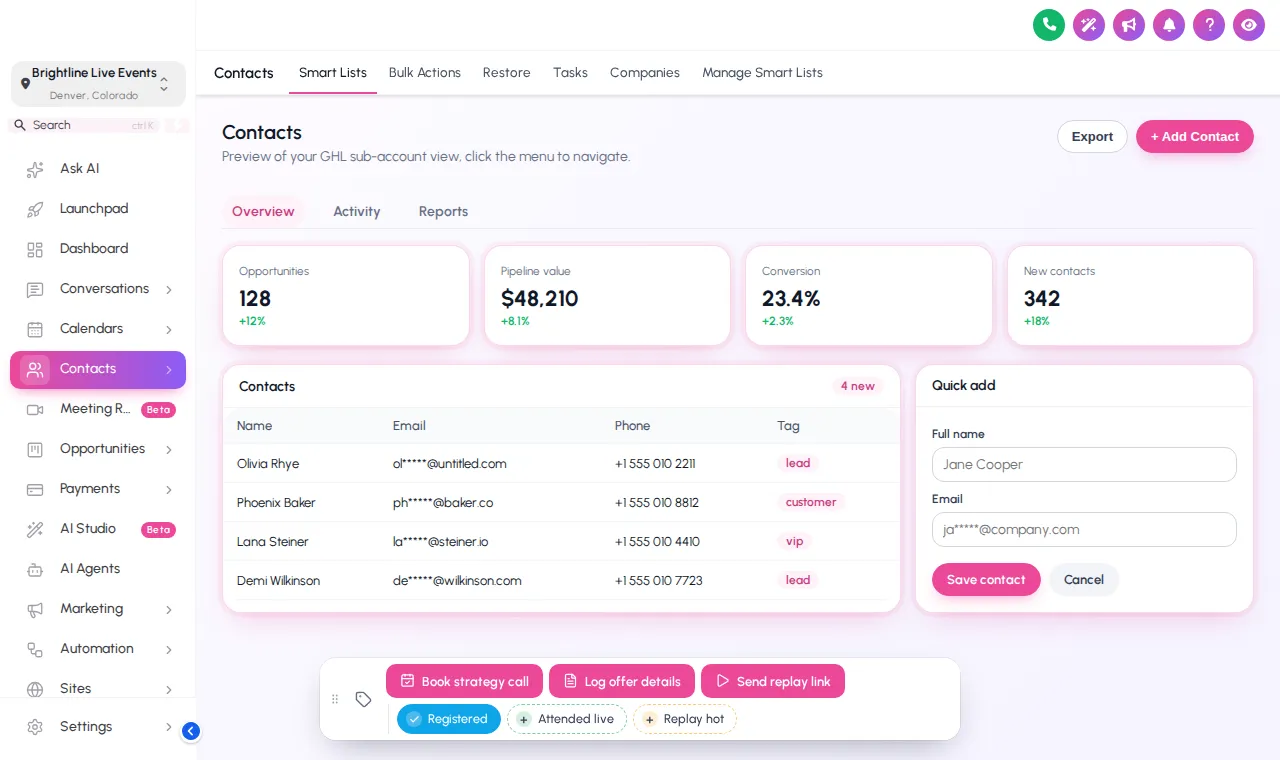
Now showing: A colour per tag. This is the real contact actions bar. Tap a quick tag to add or remove it, press Log offer details to open its form, or drag the bar by its grip. Nothing is saved in the preview; inside GoHighLevel the contact updates at once.
What do GoHighLevel contact actions actually do?
The contact actions bar is a floating toolbar on GoHighLevel contact records. It holds quick tags you add or remove in one tap, buttons that tag a contact to start a workflow, and small forms that save straight into custom fields. It changes how fast people work, not what your automations do.
Three building blocks, mixed however your team works:
Chips that toggle a tag
Registered, Attended live, Replay hot. Each chip shows whether the tag is on, in its own colour, your brand colour, or green-on and grey-off.
One tap, one workflow
"Book strategy call" adds a tag your booking workflow listens for. "Send replay link" can add and later remove its tag.
Fields without the scroll
"Log offer details" opens a short form (webinar date, offer interest, budget) and saves each answer to a custom field.
Where setters and closers use the bar
During the live session
A VA watching chat tags people who ask buying questions as "Replay hot" from their contact record, without leaving the page.
The first hour after
Setters work the attendee list top to bottom: "Attended live" on, "Book strategy call" pressed, next contact. The booking workflow does the rest.
Replay window
No-shows get "Send replay link"; the replay email workflow starts from that tag, and the tag comes off when the window closes.
Sales calls
Closers log webinar date, offer interest and budget in the quick form, so the next person on the record sees it in custom fields.
Fewer clicks, cleaner tags
Tag by typing, hope it is spelt right
- "attended-live", "Attended Live" and "attended" all exist
- Workflows miss contacts because the tag did not match
- Offer notes end up in free-text notes nobody searches
The same tag, every time
- Chips add exactly the tag you defined
- Buttons trigger the workflow you already trust
- Form answers land in the right custom field
Build your bar in four moves
List the tags
Write down the three to five tags your launch workflows already start from.
Add chips and buttons
Create a chip per tag and a button per workflow in the editor, with a label your team understands.
Map the form
Point each quick-form field at an existing custom field and pick a position for the bar.
Publish
With the one-line install in place, it appears on every contact record at once.
Included from Stage Pro (and in Main Event)
Everything in Live Start plus mega menus, a floating menu, the dashboard and pipeline designers and the contact actions bar. One-time payment, lifetime access. Login emailed within minutes (max 24 hours).
Contact actions questions
How the bar uses your tags, fields and workflows, and what it never touches.
What is the GoHighLevel contact actions bar?
Which package includes the contact actions bar?
Does a quick tag do anything a normal tag does not?
Where does the data from a quick form go?
Can a button start a booking or replay workflow?
Where can the bar sit on the screen?
Can different sub-accounts have different buttons?
Do I need to write code to set it up?
Does the bar slow GoHighLevel down or change my data model?
Works best alongside
The tags your bar adds move cards across a restyled pipeline board, and a floating quick menu covers the pages around the contact. Back to the GHL Customizer Studio overview.
Dashboard designs
Dashboard designer: 18 sub-account dashboard designs, tried live on a sample webinar launch dashboard.
From Stage ProThemes and dark mode
27 themes, 11 UI kits, dark mode, brand colours and logo for every GoHighLevel screen.
From Live StartPipeline boards
Pipeline board designer: 12 opportunities board designs, tried live on a sample registrant pipeline.
From Stage ProMenus and navigation
Menu layouts: sidebar or top bar, 8 top-bar styles, 8 mega menu styles, 8 header styles and a floating quick menu.
From Live StartLogin page designs
16 animated login page designs for the GoHighLevel sign-in, two-factor and password reset screens.
From Live StartCalculator widgets
Calculators: 134 templates in 14 types (no-show, ROI, stack replacement, speed to lead and more) for websites and funnels.
From Main EventPopup templates
Popups: 43 templates in 7 formats for inside GoHighLevel and for websites and registration pages.
From Main EventSocial proof notifications
Notifications and social proof: 94 templates in 32 types, including live counters, video and countdown collectors.
From Main EventFloating widgets
Floating widgets: 51 templates in 7 types, with 34 networks and leads sent into GoHighLevel.
From Main EventMake the first hour after the webinar three taps per contact
The contact actions bar comes with Stage Pro, along with the dashboard and pipeline designers and mega menus.
One-time payment · login emailed within minutes (max 24 hours) · we never ask for your GoHighLevel password
GHL Webinar Snapshot is an independent team and is not affiliated with, endorsed by or sponsored by HighLevel, Inc. GoHighLevel and HighLevel are trademarks of their owner and are used here only to describe compatibility. The GHL Customizer account runs on the GHL Customer Care customizer platform; you customize and install it yourself. Prices are one-time, in USD, and come from our pricing file (last updated 2026-10-02).