
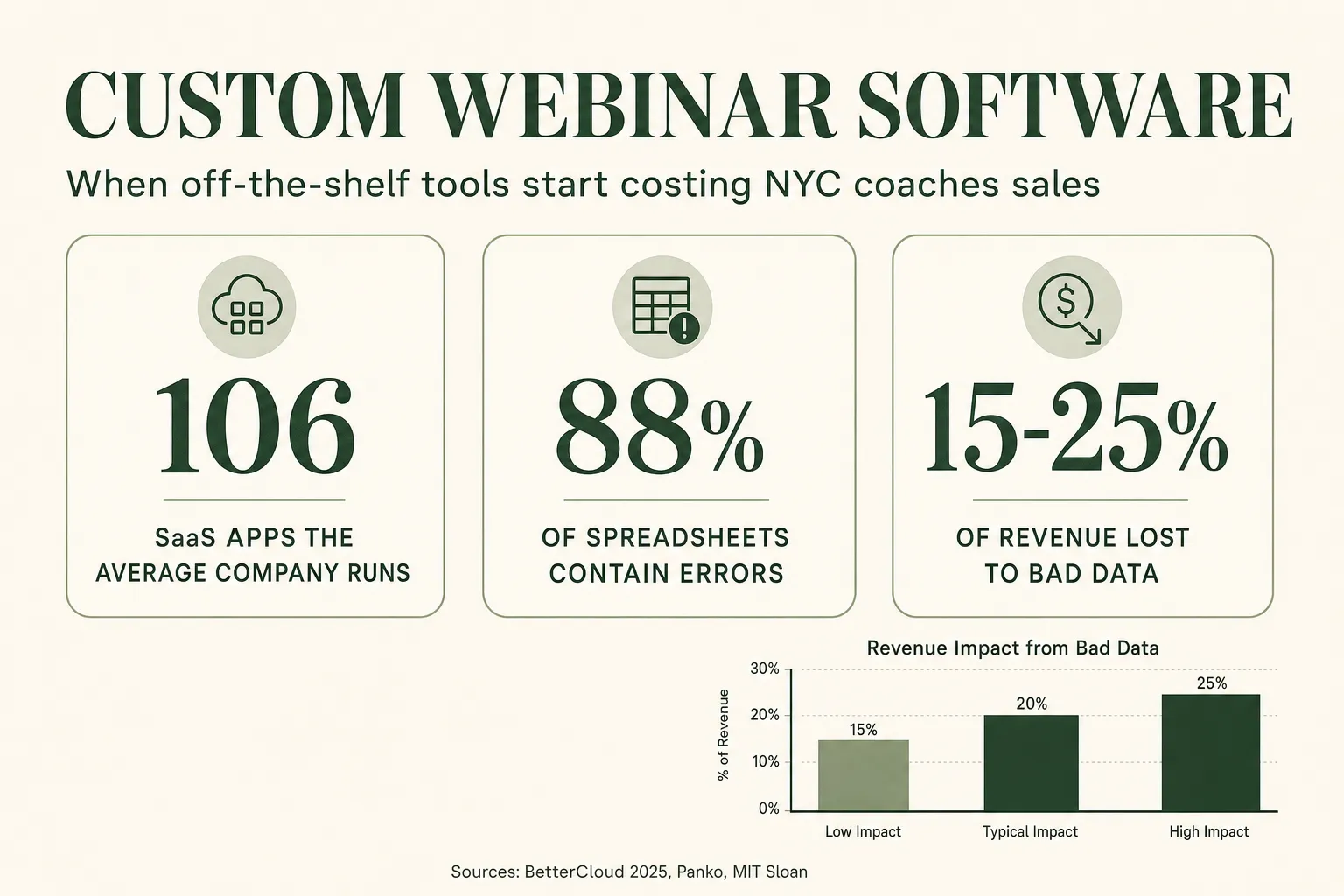
For most NYC coaches and course creators, “webinar software” isn’t one system — it’s ten disconnected tools taped together, and the sales you lose fall straight through the gaps between them. A registration platform here, a spreadsheet of attendees there, Stripe in one tab, Calendly in another, a CRM you half-use, and an inbox where hot leads go to die. Each tool works fine on its own. The problem is the seams — the manual re-keying, the data that never syncs, the follow-up that fires a day late — and in a market as competitive as New York, those seams are where the deal quietly goes to a faster operator. This post lays out when off-the-shelf tools stop being cheaper, what the tool-sprawl research actually shows, and when a custom-built webinar system starts paying for itself — every figure sourced.
Table of contents
- What “custom webinar software” actually means
- The real problem: tool sprawl and the toggling tax
- Where the sales leak out: spreadsheets, silos, and slow follow-up
- What the duct-taped stack really costs a NYC operator
- Why this hits New York especially hard
- Off-the-shelf vs custom: when it’s time to build
- What a custom webinar system looks like
- FAQ
What “custom webinar software” actually means
Custom webinar software is a system built around how your funnel works — one place where registrants, attendance, payments, replays, and booked calls all live — instead of a generic tool you bend your business to fit. It’s not a new webinar-streaming app. It’s the layer underneath: a CRM that speaks registrants and show-up rate, an attendee portal where people confirm seats and watch replays, dashboards that pull from your webinar platform and Stripe at once, or an AI agent trained on your exact offer.
Most operators don’t start here, and they shouldn’t. When you run your first few webinars, off-the-shelf tools are the right call — cheap, fast, good enough. The trouble starts later, when you’re running webinars every month, your list is in five places, and you’re spending Sunday night copying attendee data between apps so Monday’s follow-up goes out. That’s the moment the “cheap” stack starts charging you in a currency you can’t see on an invoice: your time, and the deals that slip through the cracks.
The honest framing isn’t “custom software is better.” It’s when the seams between your tools cost more than a system that removes them. The rest of this post is about finding that line.
The real problem: tool sprawl and the toggling tax
The core issue isn’t any single tool — it’s how many you run, and how much work it takes to keep them in sync. SaaS sprawl has become the default state of every growing business, and webinar operators are no exception.
The numbers are striking no matter whose count you use. BetterCloud’s 2025 report puts the average company at 106 SaaS apps — and notes that’s actually down from 130 in 2022, as firms try to consolidate. Measured by total portfolio, Zylo counts 275 apps per organization, with roughly 49% of purchased licenses going unused. The methodologies differ, but the direction is identical: the modern operator is drowning in tools.
Now add the cost of moving between them. Harvard Business Review, analyzing behavioral data from Qatalog, found that workers toggle between applications about 1,200 times a day, and that reorienting after each switch adds up to nearly 4 hours a week — the equivalent of roughly 5 work-weeks a year spent just context-switching. A separate Qatalog study with Cornell University found it takes about 9.5 minutes to get back into a productive flow after jumping between digital apps. Asana’s Anatomy of Work Index adds that knowledge workers spend roughly 60% of their time on “work about work” — coordination, duplication, and searching for information — rather than the skilled work they’re actually paid for.
For a solo coach or a lean course team, “work about work” has a specific face: it’s you, exporting a registrant CSV, cleaning it, importing it somewhere else, and hoping nothing got dropped. That’s the toggling tax, and it scales with every webinar you run.
Where the sales leak out: spreadsheets, silos, and slow follow-up
The duct-taped stack doesn’t just waste time — it loses money in three specific, measurable places. Each one maps to a tool that was never meant to be a system of record.
1. The spreadsheet you’re treating as a database. Almost every webinar operator has one: the master sheet of registrants, attendance, and payment status that everything else keys off. The problem is that spreadsheets are error factories. In the most-cited academic work on the subject, University of Hawaii researcher Raymond Panko found that roughly 88% of spreadsheets contain errors, with operational audits repeatedly turning up mistakes in the overwhelming majority of real-world files. When your follow-up, your revenue tracking, and your “who showed up” list all run off a hand-maintained sheet, a single mis-sorted column can quietly mis-route a batch of hot leads.
2. The data silos that never talk. Your webinar platform knows who attended. Stripe knows who paid. Your email tool knows who opened. Your calendar knows who booked. But none of them know what the others know — so the picture of any given lead is smeared across four dashboards, and no one is looking at all four at once. This is the “poor data quality” problem in miniature, and it’s expensive at scale: MIT Sloan Management Review estimates companies lose 15–25% of revenue to bad data, and Gartner puts the average cost of poor data quality at $12.9 million a year per organization. You’re not losing millions — but you’re losing the same way: decisions made on incomplete, out-of-sync data.
3. The follow-up that fires too late. This is the one that costs the most and hurts the most, because the data on it is unambiguous. Harvard Business Review’s study of online sales leads found that firms reaching out within an hour were 7x more likely to have a meaningful qualifying conversation than those that waited just one hour longer — and 60x more likely than those that waited a day. The classic MIT / InsideSales lead-response research found that contacting a lead within 5 minutes versus 30 makes you about 21x more likely to qualify them. When your follow-up depends on you manually noticing a form fill, exporting a list, and sending an email, you are structurally slow — and slow is where the sale goes to someone else.
What the duct-taped stack really costs a NYC operator
The true cost of tool sprawl isn’t the subscriptions — it’s the hours you pour into gluing the tools together, plus the deals that leak while you do. The monthly software bill is the number you see; the labor and the lost sales are the number that actually matters.
Here’s a simple, illustrative model for a NYC coach running monthly webinars:
The cost of the duct-taped stack — an illustrative example
You run one webinar a month across a streaming tool, a landing-page builder, Stripe, a spreadsheet, an email platform, and Calendly. Every launch, you spend roughly 6–8 hours exporting, cleaning, and re-importing data so reminders and follow-up go out. Two or three hot leads slip past the follow-up window each month because the hand-off was late. On a $3,000 program, even one missed close is ~$3,000 — call it $36,000 a year — on top of the hours.
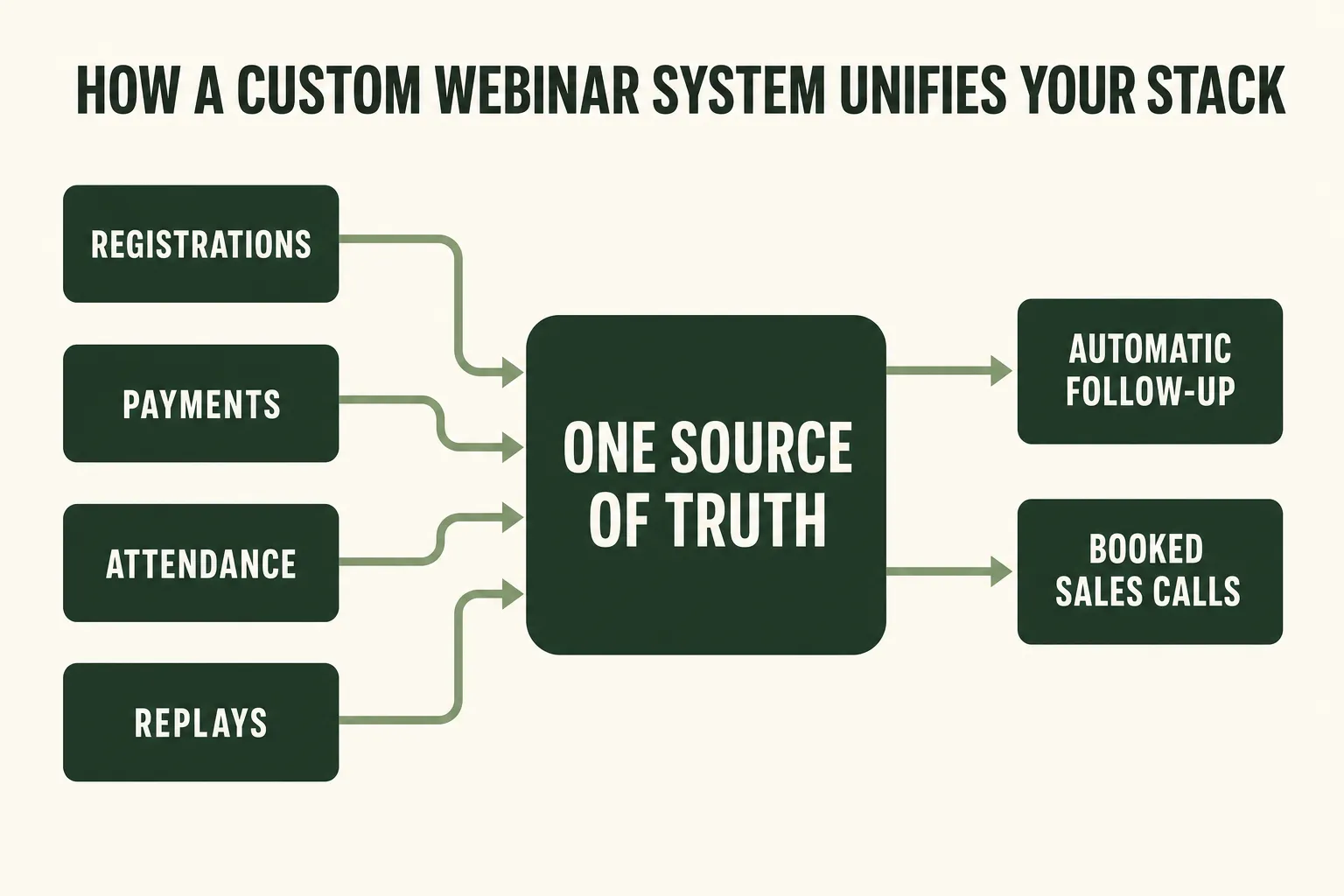
A custom system unifies the stack: registration, attendance, payment status, and booked calls live in one source of truth. Follow-up fires automatically the moment behavior changes, no CSV required. You reclaim the launch-week hours and stop losing the leads that used to fall through the seams.
Plug in your own numbers — your webinar cadence, your close rate, your program price — and the shape holds for almost everyone. Because slow follow-up costs qualified conversations, and because the manual glue work grows with every webinar, the duct-taped stack gets more expensive exactly as you scale. That’s the opposite of what you want your infrastructure to do.
Custom software doesn’t make sense for everyone, and it never makes sense too early. But once you’re running webinars regularly and the manual work is measured in hours per launch, the math flips: the system that removes the seams costs less than the seams do.
Why this hits New York especially hard
New York is one of the deepest markets in the country for coaches, creators, and B2B founders — which means more competition for the same audience, and a faster path to a competitor when your follow-up lags. According to the U.S. Small Business Administration’s Office of Advocacy, New York State is home to about 2.2 million small businesses — 99.8% of all businesses in the state — employing 46.3% of the private workforce (2025 profile). That density is the whole story.
Two things follow from it for a webinar operator here:
- Your prospect has options one search away. In a market this crowded, a lead who attends your masterclass, gets a follow-up email 36 hours later, and hears nothing else has already seen three competing offers. Speed of follow-up isn’t a nicety in New York — it’s the difference between booking the call and watching the lead book someone else’s. And speed is precisely what a unified system buys you.
- The coaching field itself is growing and professionalizing. The International Coaching Federation’s 2025 Global Coaching Study counted 122,974 coach practitioners worldwide, up 15% since 2023, in an industry generating $5.34 billion. More coaches means more webinars means more noise — and the operators who win are the ones whose systems let them respond faster and remember more about every lead than a spreadsheet ever could.
If you’re competing for attention in the NYC market, the invisible advantage goes to the operator whose registrant data, payment status, and follow-up all live in one place — because they can act on a lead’s behavior in minutes, while everyone else is still reconciling tabs.
Off-the-shelf vs custom: when it’s time to build
The decision isn’t “off-the-shelf tools vs custom software” in the abstract — it’s a question of stage. Early on, generic tools win. Past a certain volume, the seams win, and a custom system is cheaper than the chaos. Here’s the honest comparison.
Off-the-shelf stack vs a custom webinar system
| Feature | Custom webinar system | Duct-taped off-the-shelf stack |
|---|---|---|
| Cost to get started | Higher upfront build | Low — monthly subscriptions |
| Fits your exact funnel | Built around it | You bend to fit the tool |
| Single source of truth | Yes — one unified system | No — data smeared across apps |
| Manual re-keying per launch | None — data flows automatically | Hours of export/import glue work |
| Follow-up speed | Instant, behavior-triggered | As fast as you manually notice |
| Cost as you scale | Flat — the system absorbs volume | Rises — more webinars, more glue work |
| You own it | Yes — full IP, your infrastructure | No — you rent every piece |
The tell that you’ve crossed the line is usually one of these: you’re spending real hours every launch moving data by hand; a mistake in your master spreadsheet has already cost you; leads are leaking because follow-up is late; or you’re paying for SaaS seats you barely use while still missing the one system you actually need. If two or more of those are true, you’ve outgrown the off-the-shelf stack.
A common middle path is worth naming: you don’t always need a full custom build. Sometimes the right move is consolidating onto a platform like GoHighLevel and migrating your webinar funnel into it, then layering custom software only where GHL genuinely can’t reach — a specialized portal, a bespoke dashboard, or a custom AI agent. Build what you must; buy what you can.
What a custom webinar system looks like
A custom webinar system replaces the pile of tools with a handful of components built around your funnel — and wires the whole thing to fire follow-up automatically. Here’s the shape of it, end to end.
The pieces we build most often for webinar operators:
- A webinar CRM and registration system built around your funnel — registrant pipelines, show-up tracking, replay-watch scoring, and reminders in one place, instead of a generic CRM that has no idea what a “show-up rate” is.
- An attendee and member portal where registrants confirm their seat, get the live link, watch replays, and book calls — and where paying members access what they bought, instead of chasing links scattered across email and DMs.
- Course and event dashboards that pull from your webinar platform, Stripe, and CRM at once, so show-up rate, revenue per webinar, and funnel drop-off are visible in real time — no more reconciling four tabs.
- A custom AI agent trained on your exact offer — a registration concierge, a no-show recovery caller, or an analytics agent — rather than a generic chatbot that doesn’t understand your funnel. This is a different, deeper build than the AI chatbot the snapshot ships, tuned to your business specifically.
The point of unifying the stack isn’t tidiness — it’s speed and memory. When every tool feeds one source of truth, follow-up can fire the instant a lead’s behavior crosses a threshold, hitting the response window that HBR’s research says decides the sale. And the same unified data is what makes multi-touch attribution and lead scoring actually trustworthy instead of best-guess.
This is exactly the kind of system our team builds. We use Claude Code and modern agent SDKs to ship production software faster — and cheaper — than a traditional dev shop, purpose-built for webinar hosts and course creators, with full IP transfer so you own every line. A custom CRM or portal typically takes a few weeks, not months.
FAQ
What is custom webinar software?
It's a system built around your specific webinar and course funnel — a CRM that tracks registrants and show-up rate, an attendee or member portal, real-time dashboards, or a custom AI agent — instead of a generic off-the-shelf tool you have to bend your business to fit. It unifies registration, attendance, payments, replays, and booked calls into one source of truth so follow-up can fire automatically.
When should a coach or course creator move off off-the-shelf tools?
When the seams start costing more than the tools save. The usual signals: you spend real hours every launch exporting and re-importing data by hand, a spreadsheet mistake has already cost you a lead or a payment, follow-up is going out late because it depends on you noticing manually, or you're paying for SaaS seats you barely use while still missing the one system you need. If two or more are true, you've likely outgrown the duct-taped stack.
Isn't custom software more expensive than a few SaaS subscriptions?
Upfront, yes — the build costs more than a monthly subscription. But the off-the-shelf stack charges you in hidden ways: hours of manual glue work per launch (HBR/Qatalog research puts app-switching alone at ~4 hours a week), errors from spreadsheet-based records (~88% contain errors per Panko's research), and lost sales from slow follow-up. As you run more webinars, the manual cost rises while a custom system's cost stays flat. Past a certain volume, custom is the cheaper option.
Do I have to rebuild everything, or can I keep GoHighLevel?
You rarely need to rebuild everything. A common path is consolidating your funnel onto GoHighLevel first, then layering custom software only where GHL can't reach — a specialized portal, a bespoke dashboard, or a custom AI agent trained on your offer. Build what you must, buy what you can. We help operators decide which is which.
How long does a custom webinar system take to build?
It depends on scope. Simpler custom AI agents are often live in about 2–3 weeks; custom CRMs, registration systems, and attendee portals typically take a few weeks to a couple of months. Because we build with Claude Code and modern agent SDKs, timelines are usually about half what a traditional dev shop quotes — and you own the code outright when it's done.
Do I own the code, or am I renting it like SaaS?
You own it — 100%. Full IP transfer is included by default: the code lives in your repository, deploys to your infrastructure, and runs under your accounts, with no per-seat rent and no lock-in. That's a core difference from the off-the-shelf stack, where you rent every piece indefinitely.
About the author
Derek Haywood is a GHL Automation Engineer based in Denver, CO. A former B2B SaaS sales engineer, he moved into GoHighLevel implementation and now obsesses over the plumbing behind webinar funnels — tags, triggers, lead scoring, and the pipelines that surface buyers without manual CSV scrubbing. He has a low tolerance for broken automations and an even lower one for a business run out of a spreadsheet.
Related reading
- How to Migrate Your Webinars to GoHighLevel (Without Losing Data)
- Webinar Lead Scoring: Call the Right Buyers First
- Webinar Multi-Touch Attribution: See Which Channels Actually Book Calls
- The Replay-Tag Pipeline: Surface Hot Buyers Without Scrubbing CSVs
- How to Book Sales Calls From Webinars: The Attendee-to-Consult Playbook
Sources
- BetterCloud — State of SaaSOps (106 apps average, 2025)
- Zylo — SaaS Management Index (275 apps, 49% unused licenses)
- Harvard Business Review — How Much Time Do We Waste Toggling Between Applications? (2022)
- Qatalog + Cornell — Workgeist Report (9.5 minutes to refocus)
- Asana — Anatomy of Work Index (60% “work about work”)
- Raymond Panko — What We Know About Spreadsheet Errors (~88% contain errors)
- MIT Sloan Management Review — Seizing Opportunity in Data Quality (15–25% of revenue)
- Gartner — Poor data quality costs $12.9M/year on average
- Harvard Business Review — The Short Life of Online Sales Leads (7x / 60x)
- Lead Response Management Study (MIT / InsideSales — 21x within 5 minutes)
- Livestorm — 2026 Webinar Benchmark Report (47.7% average show-up)
- SBA Office of Advocacy — New York 2025 Small Business Profile (PDF)
- ICF — 2025 Global Coaching Study Executive Summary (122,974 coaches)