
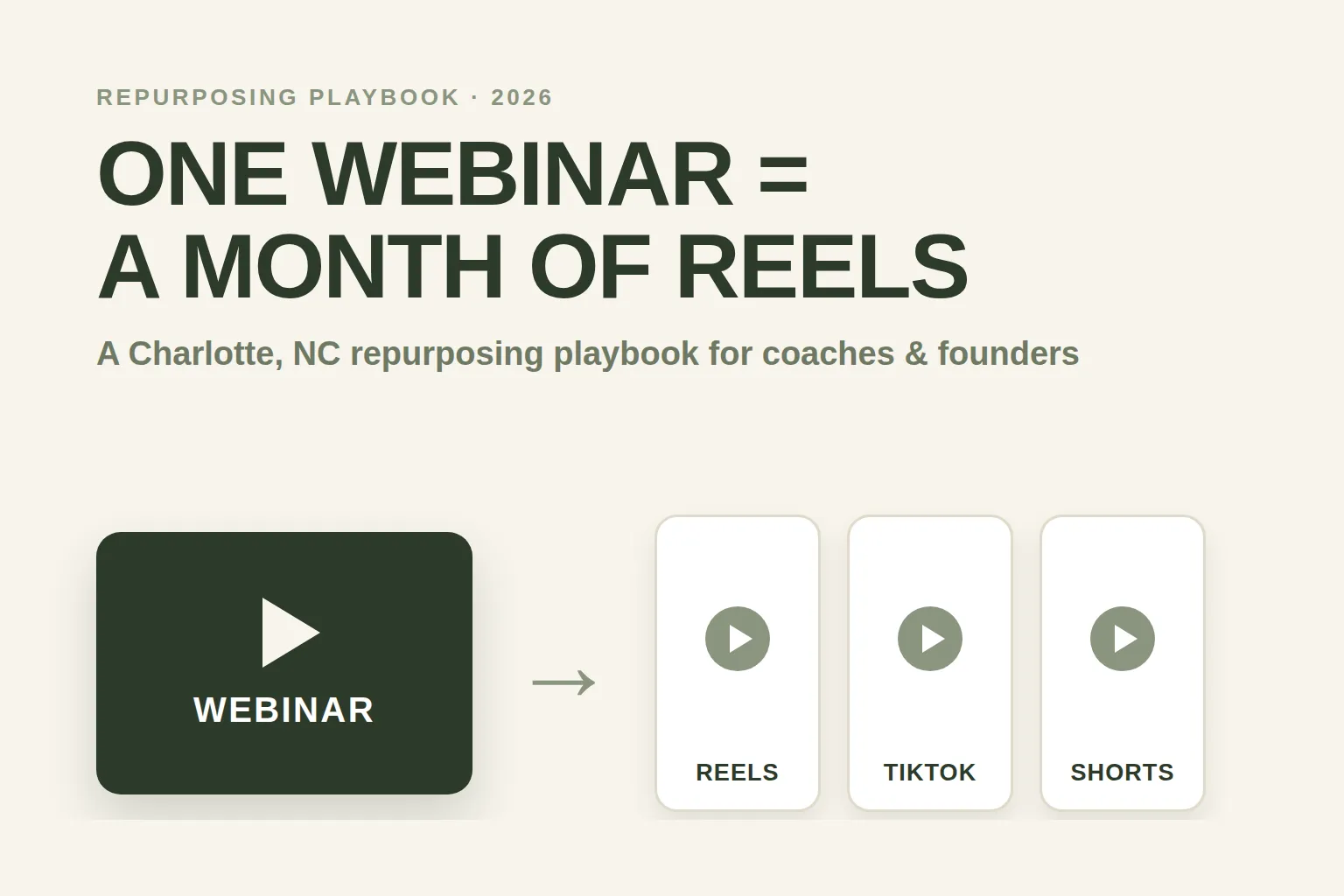
To turn one webinar into a month of short-form video, record the live session, pull 20–30 self-contained teaching moments from the transcript, cut each into a captioned vertical clip under 60 seconds, and schedule them across Instagram Reels, TikTok, and YouTube Shorts three to five times a week — then wire the comments and DMs those clips generate straight back into your registration flow. One 45-minute webinar already contains a month of content; the work is packaging it and posting it consistently, not creating something new every day.
For a Charlotte coach, course creator, or B2B founder, this is the cheapest audience-growth lever you have. You are already producing the hardest asset — a live teaching session people paid attention to for the better part of an hour. Most operators broadcast it once, drop the replay in an email, and let it die. This playbook shows you how to mine that single recording into weeks of daily short-form video that refills your next webinar — and how a done-for-you social media content engine runs the whole loop so you can stay focused on teaching and closing.
Table of contents
- Why short-form video is the cheapest way to fill a webinar
- The 7-step webinar-to-Reels repurposing playbook
- A 30-day posting calendar from a single webinar
- Close the loop: turn clip comments into registrations
- What this looks like for a Charlotte operator
- DIY vs. a done-for-you content engine
- FAQ
Why short-form video is the cheapest way to fill a webinar
Short-form video is the highest-return content format available, and repurposing your webinar into clips means you get that reach at almost zero marginal cost — you’re re-cutting an asset you already made, not producing new content. For a webinar business, that matters twice: clips build the cold audience that becomes future registrants, and they warm the people already in your world so more of them actually show up.
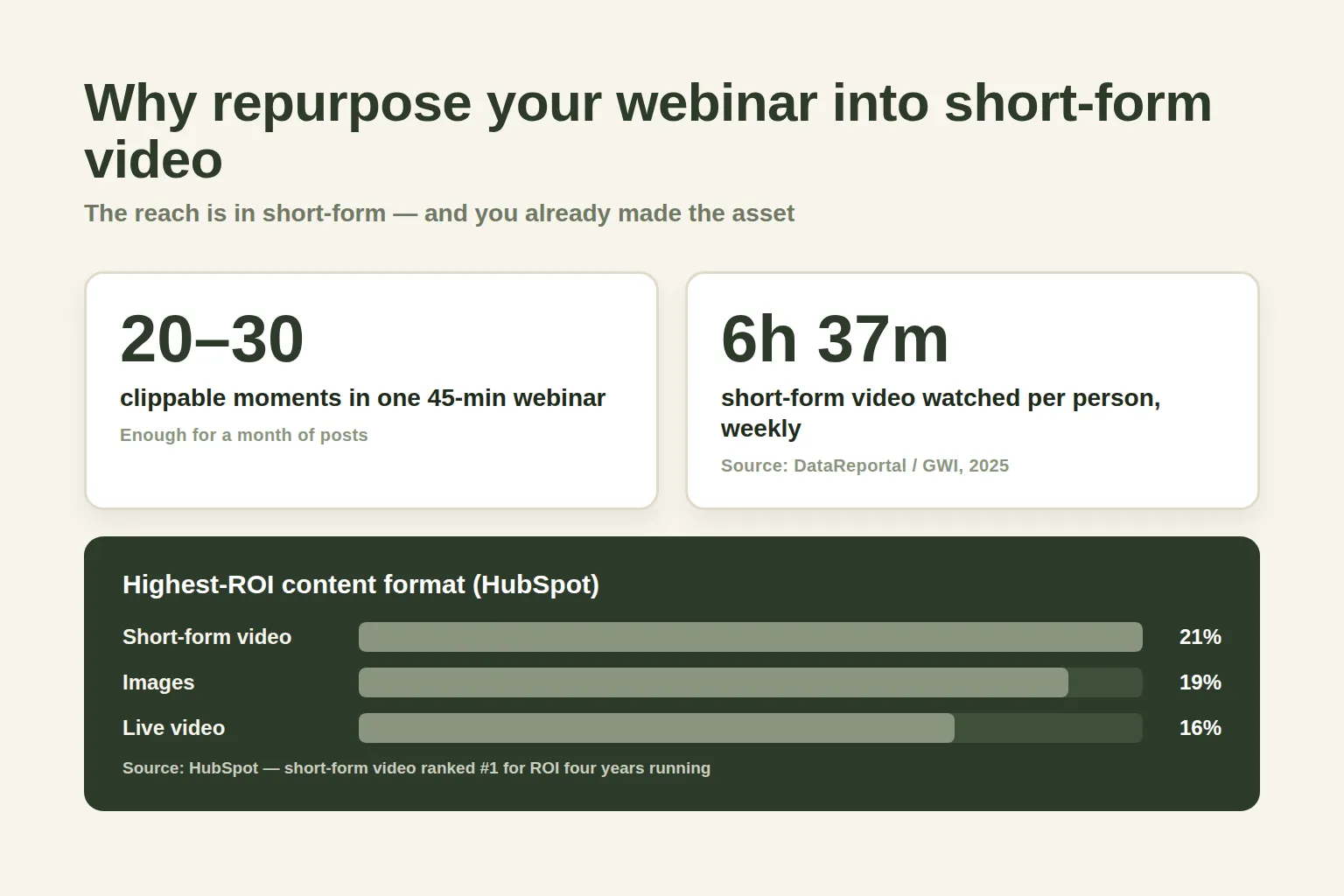
The data behind the format is unusually consistent. In HubSpot’s marketing research, the content types that deliver the highest ROI are short-form video (21%), images (19%), and live-streamed video (16%) — with short-form holding the top spot four years in a row, and 56% of marketers calling video their most effective content overall. It’s also where attention actually is: internet users spend roughly 6 hours 37 minutes every week on short-form video alone, per DataReportal and GWI.
Here’s the part most Charlotte operators miss: your webinar traffic problem and your social-media problem are the same problem. The average webinar converts about 40% of registrants into live attendees, and 59% of people register in the week before the event (GoTo). A steady drip of clips keeps you top-of-mind during exactly that window — so more of your audience registers late, and more of the ones who registered actually show up. Reach and show-up rate feed each other.
The 7-step webinar-to-Reels repurposing playbook
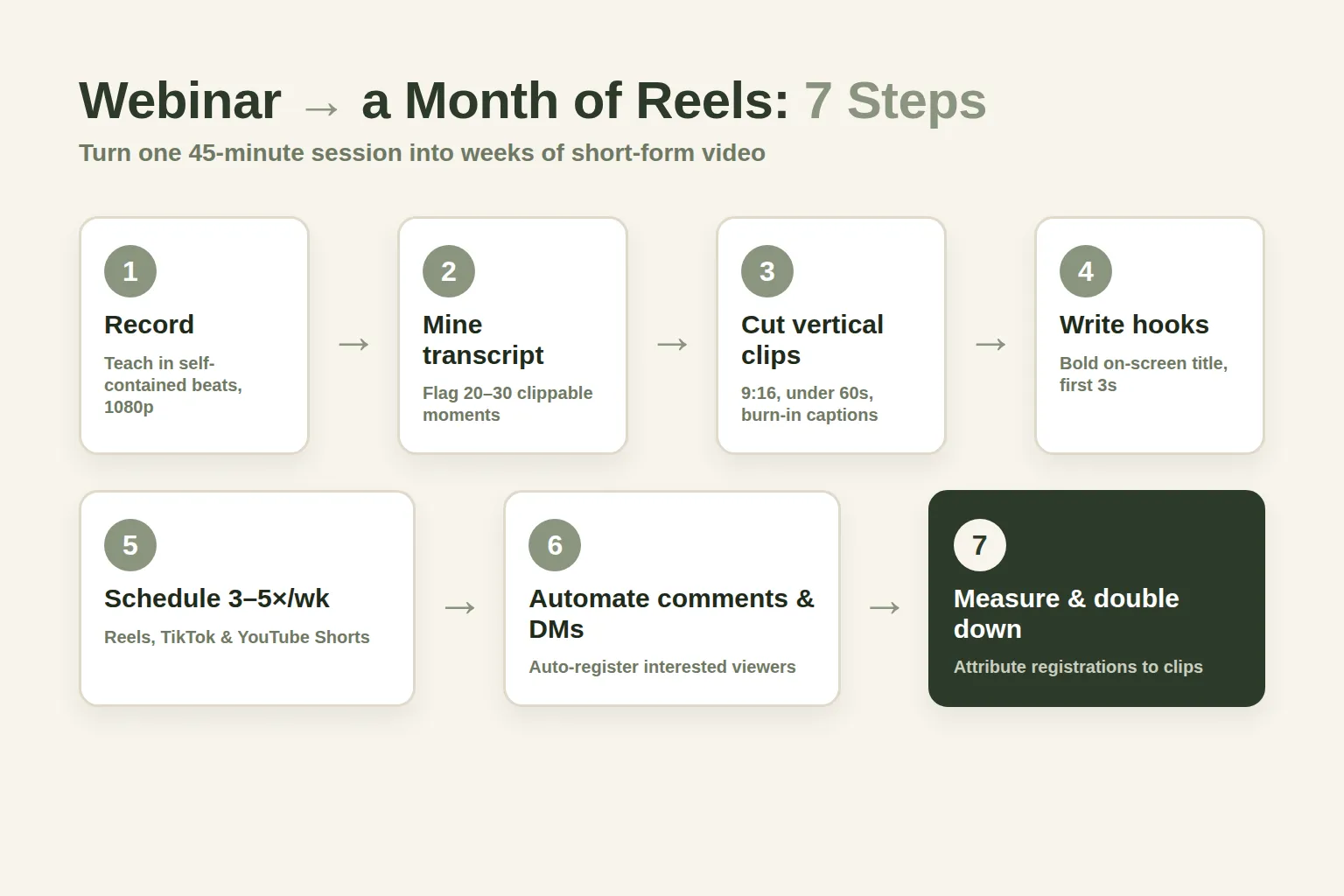
The repurposing workflow is seven repeatable steps: record with clips in mind, mine the transcript, cut vertical clips, write hooks and on-screen captions, schedule across platforms, connect the comment and DM automation, then measure and double down. Run it once and you have a system you can apply to every webinar you host from now on.
Step 1 — Record the webinar to be clipped, not just watched
Before you go live, set the recording up so it’s easy to cut later. Record at 1080p or higher, keep your webcam framing tight enough that a vertical (9:16) crop still shows your face, and — most importantly — teach in self-contained beats. When you make a point, land it fully before moving on. A 30-second answer that stands alone becomes a clip; a point smeared across five tangents does not. If you run live or evergreen sessions, this one habit changes your entire content output.
Step 2 — Mine the transcript for 20–30 clippable moments
Pull the transcript (GoHighLevel, Zoom, Fathom, or Otter will generate one) and scan it for moments that work out of context: a sharp definition, a myth you bust, a mini-framework, a surprising number, a before/after story, a “most people get this wrong” line. A 45-minute teaching webinar reliably yields 20–30 of these. Mark each with a timestamp and a one-line label — that label becomes the caption later.
Step 3 — Cut captioned vertical clips under 60 seconds
Crop each moment to 9:16 vertical, trim it to 15–60 seconds, and burn in captions — most short-form is watched on mute, and captioned video holds attention far longer. Keep your framing consistent so the clips feel like a series, not random uploads. Tools like Opus Clip, Descript, or CapCut automate most of this; the judgment call — which moments, which cut points — is the part that matters.
Step 4 — Write a hook and an on-screen title for every clip
The first line decides whether the clip gets watched. Open with the tension, not the throat-clearing: “Your webinar show-up rate is a reminder problem, not a topic problem,” not “Hi, in this clip I want to talk about…” Add a bold on-screen title in the first frame so the point is legible even before audio starts. This is where a generic clip becomes a scroll-stopper.
Step 5 — Schedule 3–5 posts a week across Reels, TikTok, and Shorts
Consistency is the whole game. Buffer’s analysis of over 2 million posts found that posting 3–5 times a week more than doubles Instagram follower growth, and pushing to ~10× a week lifts average per-post reach by about 24%. Post the same clip natively to Instagram Reels, TikTok, and YouTube Shorts (upload the file to each — don’t cross-post with visible other-platform watermarks, which the algorithms suppress).
Step 6 — Connect the comment and DM automation
This is the step that separates a content hobby from a webinar engine — covered in full in the next section. Every clip that performs will draw comments like “when’s the next one?” and “is there a replay?” Those are registration-intent signals, and they should trigger an automated reply and DM that captures the person and registers them.
Step 7 — Track which clips drive registrations, then double down
After a week or two, you’ll see which clips actually move people — not just which got views, but which produced comments, DMs, and sign-ups. Feed that back into the next webinar’s clipping: make more of what worked. Because everything routes through GoHighLevel, you can tie a registration back to the exact clip that sourced it using multi-touch attribution, so “post more content” becomes “post more of this.”
A 30-day posting calendar from a single webinar
A single webinar maps cleanly onto a month: 20–30 clips, posted 3–5 times a week, sorted by intent — teaching clips to build trust, story clips to build connection, and direct “register for the next one” clips to convert. You don’t need a content calendar app to start; you need a simple rotation that never runs dry.
Here’s the shape of a month built from one recording:
One webinar → a 4-week short-form calendar
| Plan | Week 1 — Teach | Week 2 — Prove recommended | Weeks 3–4 — Convert |
|---|---|---|---|
| Price | 5 clips | 5 clips | 10 clips |
| Feature 1 | Your sharpest framework or definition | A before/after story | 'Why attend live' hooks |
| Feature 2 | A 'most people get this wrong' myth-bust | A common objection, answered | Behind-the-scenes of the next session |
| Feature 3 | A quick how-to beat | A mini case or result walkthrough | Countdown + date-specific clips |
| Feature 4 | A surprising stat with your take | A question you always get asked | Testimonial-style attendee wins |
| Feature 5 | Soft CTA: 'full training linked' | Soft CTA to the replay or waitlist | Direct CTA: register for the next webinar |
The rotation matters more than perfection. Teaching and story clips earn the reach; the convert clips cash it in during the late-registration window when most sign-ups actually happen. Miss a day and nothing breaks — you simply have more clips banked for next week. That’s the quiet advantage of repurposing: your content pipeline is always full because it’s fed by an asset you already own.
Close the loop: turn clip comments into registrations
A clip that gets 10,000 views and no registrations is a vanity metric; the loop only pays off when the engagement your clips create is captured and routed into your webinar funnel automatically. This is where webinar operators lose the most money — a breakout Reel floods the comments with interest at 11pm, and by the time anyone replies, the moment is gone.
The fix is automation on three surfaces:
- Comments. An AI comment agent auto-replies to comments across TikTok, Instagram, and Facebook — answering “when’s the next session?” and “where’s the replay?” — which also feeds the algorithm the engagement it rewards with more reach.
- DMs. When someone messages “how do I join,” an Instagram and Facebook DM agent answers in your voice, qualifies them, collects their info, and registers them or books a call — 24/7.
- Attribution. Every captured contact lands in GoHighLevel tagged with its source clip, so the registration flows straight into your reminder cadence and you can see which content actually fills seats.
What this looks like for a Charlotte operator
In a market like Charlotte — where small businesses make up virtually the entire local economy — a consistent short-form presence is how a coach or founder gets discovered before a prospect ever searches for them. Small businesses account for 99.6% of all North Carolina businesses and employ about 1.8 million people, 44.2% of the state’s workforce, per the U.S. SBA. That’s a deep pool of local operators, consultants, and founders who could fill your webinars — and most of them are on Reels and TikTok during their commute, not searching Google for you.
Two Charlotte-specific realities make repurposing the right move:
- You’re competing for attention, not just search rankings. A Charlotte business coach or agency owner isn’t only found through SEO — they’re found when a genuinely useful 40-second clip lands on a local prospect’s feed. Short-form is the discovery layer that a fast website and good local search then convert.
- Consistency is the constraint, not ideas. Between client work and running the actual events, “post daily” is the thing that slips first. Repurposing removes the ideation cost; a done-for-you engine removes the production cost. Together they make daily posting survivable for a busy Charlotte operator.
DIY vs. a done-for-you content engine
You can absolutely run this playbook yourself — the bottleneck is never strategy, it’s the daily grind of clipping, captioning, scheduling, and replying, which is exactly what stalls most operators by week three. Here’s the honest trade-off, so you can decide where your hours are best spent.
Running the loop yourself vs. done-for-you
| Plan | DIY | Done-for-you engine recommended |
|---|---|---|
| Price | Your time | Managed |
| Feature 1 | You clip, caption & schedule every post | We clip your webinars into a month of posts |
| Feature 2 | You reply to comments & DMs by hand | Publish 3–5×/week across every channel |
| Feature 3 | Full control, zero monthly cost | AI comment + DM agents capture & register |
| Feature 4 | Realistic output: it slips when you're busy | Contacts routed into your GoHighLevel |
| Feature 5 | Best if you have in-house editing time | Monthly per-channel performance report |
If you’d rather teach and close than edit clips at midnight, that’s the case for handing the loop off. Our done-for-you social media service takes your webinar recordings, cuts them into short-form clips in your brand voice, publishes across all nine channels several times a week, and deploys the comment, DM, and web-chat agents that turn engagement into registered attendees — all piped into your GoHighLevel so nothing goes cold. (Weighing the broader build-vs-buy question? Our DIY vs. done-for-you social media breakdown walks through the real costs.)
FAQ
How many short-form clips can I get from one webinar?
A typical 45–60 minute teaching webinar yields 20–30 clip-worthy moments — sharp definitions, myth-busts, mini-frameworks, stories, and surprising stats that stand on their own. Posted 3–5 times a week, that's roughly a month of short-form content from a single recording, with no new filming required.
Which platforms should I post webinar clips to?
Instagram Reels, TikTok, and YouTube Shorts are the core three for short-form discovery, and you can extend to Facebook and LinkedIn. Upload the video file natively to each platform rather than cross-posting with another app's watermark, since the algorithms suppress recycled content. Short-form video is the highest-ROI content format according to HubSpot, and people watch about 6 hours 37 minutes of it per week (DataReportal/GWI), so that's where the reach is.
How often should I post the clips?
Aim for 3–5 times a week to start. Buffer's analysis of over 2 million Instagram posts found that posting 3–5 times weekly more than doubles follower growth versus 1–2 times, and posting around 10 times a week lifts average per-post reach by about 24%. Consistency matters more than any single clip — which is exactly why repurposing works, since one webinar keeps your queue full.
Do short-form clips actually fill webinars, or just get views?
They fill webinars only if you close the loop. Views are a vanity metric until the comments and DMs your clips generate are captured and routed into your registration flow. Use an AI comment agent to auto-reply to 'when's the next one?' comments and a DM agent to register interested people, then tag each contact with its source clip in GoHighLevel so you can attribute registrations — and booked calls — back to the content that drove them.
Is it worth paying for a done-for-you content engine?
It depends on where your time is most valuable. The strategy is simple; the bottleneck is the daily clipping, captioning, scheduling, and replying, which is what causes most operators to quit by week three. If you have in-house editing time, DIY works. If you'd rather spend your hours teaching and closing, a done-for-you engine handles production and the comment/DM automation so the loop actually runs every week instead of stalling.
How do I keep the comment and DM automation compliant?
Only message people who initiated contact or clearly opted in, honor opt-out requests like STOP immediately, and follow each platform's automation policies as well as TCPA rules for any SMS follow-up. Build the consent step into the flow from the start rather than adding it later. Our SMS compliance guide covers the specifics for webinar reminder and follow-up messaging.
About the author
Priya Shankar is a Course Launch & Conversion Coach based in Seattle, WA. She works with course creators and founders who teach to sell — masterclasses, demos, and high-ticket coaching webinars — and thinks as much about the offer and the room energy as the automation underneath it. She writes about turning live teaching into systems that capture, nurture, and book the people most ready to buy.
Related reading
- DIY vs. Done-for-You Social Media for Webinars
- Instagram DM Automation for Webinars
- Why Show-Up Rate Is the Only Webinar Metric That Compounds
- Webinar Benchmarks 2026: Show-Up Rates & Conversion Data
- The Best Time to Host a Webinar in 2026
- Live vs. Evergreen Webinars: Which to Run
Sources
- HubSpot — Video Marketing Statistics (short-form #1 for ROI)
- HubSpot — 2026 Marketing Statistics & Trends
- DataReportal / GWI — Digital 2025 April Global Statshot
- Buffer — How Often to Post on Instagram (2M+ posts)
- GoTo — Webinar Benchmarks Every Marketer Should Know
- U.S. SBA Office of Advocacy — North Carolina 2025 State Profile