
For most webinar registration pages, an AI chat widget converts more sign-ups than a static contact form — because it answers a prospect’s objection in the moment, captures and qualifies them in one conversation, and never makes them wait for a follow-up that the average business takes 42 hours to send. A form is passive: it collects fields and then goes quiet. A chat widget is active: it registers, answers, and books while intent is still hot. For a Seattle coach or course creator paying to fill a webinar, that difference is the gap between a registrant and a bounce.
That doesn’t mean the form is dead. For a dead-simple, one-field opt-in from an audience that already knows they want in, a plain form is faster and cleaner than any chat thread. This comparison lays out exactly where each one wins, using real conversion data — not vendor hype — so you can decide which belongs on your registration page.
Table of contents
- AI chat widget vs. contact form: which converts more?
- What each one actually is
- The 5 ways a static form quietly leaks registrations
- AI chat widget vs. contact form: the head-to-head
- The speed-to-lead math no form can beat
- When a plain form still wins
- What this means for Seattle coaches and course creators
- Build it right: a custom AI chat widget trained on your funnel
- FAQ
AI chat widget vs. contact form: which converts more?
An AI chat widget converts more webinar registrations than a static contact form in most real-world setups, because it removes the two biggest reasons people fail to register: unanswered hesitation and delayed follow-up. A form asks the visitor to trust you enough to hand over their details with no conversation and no answers. A chat widget meets the exact objection standing between them and signing up — “is this live or a replay?”, “will I get the recording?”, “is this right for a beginner?” — and turns that moment into a registration.
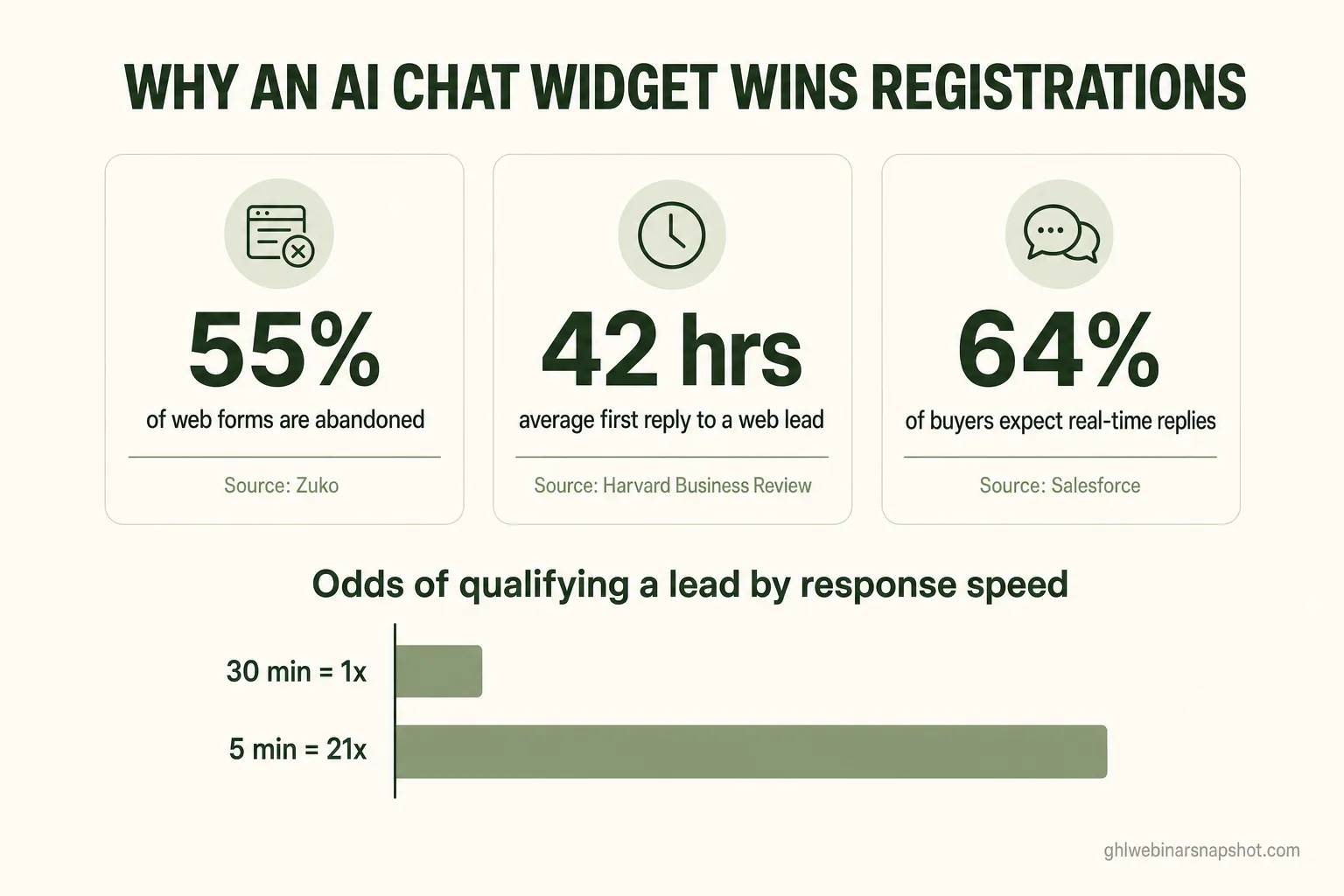
Here is the shape of the problem, in numbers that hold up across industries:
None of these are chat-vendor marketing claims — they’re independent benchmarks. Put together, they describe a registration process that leaks in two places: at the form itself, and in the silence afterward. An AI chat widget is the one tool that plugs both leaks at once, which is why the webinar chatbot has become a core registration channel rather than a support nicety.
What each one actually is
A contact form is a passive data-capture block; an AI chat widget is an active conversation that captures, answers, qualifies, and books — in real time, 24/7. They look similar on the page, but they do fundamentally different jobs.
- The contact / registration form. A set of fields — name, email, maybe a phone number — and a submit button. The visitor does all the work: reads the page, resolves their own doubts, decides, and fills it out. If they hesitate, there’s nothing to catch them. After submission, they enter whatever follow-up sequence you’ve wired up — and how fast that fires is entirely on your automation, not the form.
- The AI chat widget. A conversational agent in the corner of your page that greets visitors, answers questions instantly in natural language, collects the same registration details inside the conversation, and — done right — checks the person against your ideal-attendee criteria and books a sales call when they’re a fit. Modern widgets are AI-driven, not a decision-tree bot, so they handle the messy, real questions a form can’t.
The distinction that matters for conversion: a form can only record intent that already exists. A chat widget can create it — by resolving the hesitation that would otherwise end in a closed tab.
The 5 ways a static form quietly leaks registrations
A static form loses registrations at five predictable points, and a webinar operator paying for traffic is paying for every one of those leaks. Naming them makes the comparison concrete.
- Abandonment. Roughly 55% of people who start a web form never finish it (Zuko). Every extra field, every moment of doubt, is an exit.
- Unanswered objections. A form can’t tell a nervous registrant that the session is beginner-friendly or that the replay is included. The question goes unanswered, and the visitor leaves to “think about it.”
- Delayed follow-up. Even when the form is submitted, the average business takes 42 hours to make first contact, and 23% never respond (HBR). For a webinar that’s three days out, that lag is fatal.
- After-hours dead time. A meaningful share of registrations happen at night — online activity peaks around 9 p.m. (Oberlo). A form submitted at 9 p.m. sits untouched until morning; a chat widget answers immediately.
- No in-the-moment qualification. A form treats a tire-kicker and a ready-to-buy founder identically. It can’t ask the one question that separates them, so your best leads wait in the same queue as everyone else.
Here’s what that follow-up gap looks like once a form is submitted — the reality most operators never see:
Nearly a quarter of businesses never reply at all, and only about a third answer within the hour. The registration page is the narrowest part of your webinar conversion funnel — and a form leaves the whole thing waiting on a follow-up that too often never comes.
AI chat widget vs. contact form: the head-to-head
On the metrics that decide whether a click becomes a registrant — response speed, availability, objection handling, and in-the-moment qualification — the AI chat widget wins on every one; the form wins only on raw simplicity. Here’s the direct comparison for a webinar registration page.
AI chat widget vs. contact form on a webinar registration page
| Feature | AI Chat Widget | Contact Form |
|---|---|---|
| Response to a question | Instant, in natural language | None — visitor must self-serve |
| Works 24/7 with no lag | Yes — answers at 9 p.m. or 3 a.m. | Form is always up, but follow-up is not |
| Handles objections in the moment | Yes — replay, level, price, fit | No |
| Qualifies by your ideal-attendee criteria | Yes — inside the conversation | No — every lead looks the same |
| Books a sales call in-thread | Yes — when the buyer signal is met | No — separate step, if ever |
| Friction to register | Low — conversational, one field at a time | Low-to-medium — depends on field count |
| Best for | Paid traffic, higher-ticket, hesitant buyers | Warm audiences, one-field opt-ins |
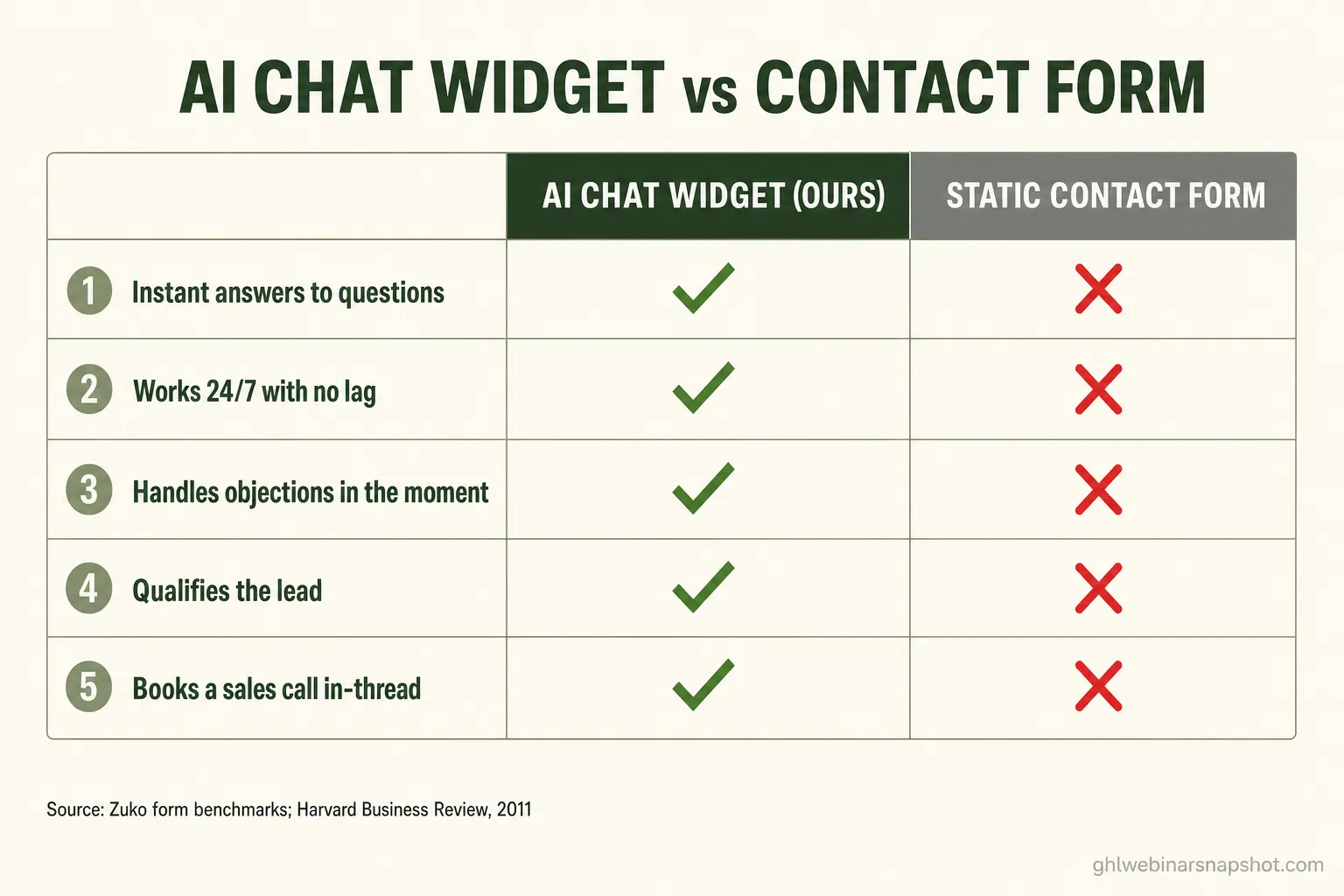
The pattern is consistent: anything that requires responding to the visitor, the widget does and the form can’t. That’s not a knock on forms — it’s just what a passive input was never built to do.
The speed-to-lead math no form can beat
The single most under-priced advantage of an AI chat widget is speed-to-lead: it responds in seconds, and the data on response time is brutal for anything slower. This is the argument that should decide the comparison for most operators.
The Lead Response Management study, analyzing InsideSales.com data across more than 15,000 leads and 100,000 call attempts, found that contacting a lead within five minutes instead of thirty made a business about 21× more likely to qualify that lead. Five minutes versus thirty. Now compare that to the 42-hour real-world average a form-plus-manual-follow-up produces, and the size of the edge becomes clear:
A form’s follow-up is only as fast as the automation and human behind it. An AI chat widget collapses that window to near-zero because it is the response — there’s no queue, no “I’ll get to it after this call,” no overnight gap. And because 64% of buyers now expect real-time interaction, that instant answer isn’t just a conversion lever — it’s the baseline experience people expect. This is the same reason instant, behavior-aware AI webinar follow-up outperforms a static drip: speed compounds.
Live-chat vendors report that visitors who engage in chat are around 2.8× more likely to convert and that adding chat lifts conversions roughly 20% (figures worth treating as vendor-reported directional benchmarks, not independent research). Even discounted heavily, they point the same direction as the Tier-1 speed-to-lead data.
When a plain form still wins
A static form is the better choice when friction must be near-zero and the visitor already knows they want in — a warm audience, a one-field opt-in, or a simple lead magnet. Being honest about this is what makes the rest of the comparison trustworthy.
Use a plain form when:
- The audience is already warm. Your email list, past attendees, or people arriving from a trusted referral don’t need convincing — a chat interaction just adds a step.
- It’s a single-field opt-in. “Enter your email for the replay” is faster as one box than as a conversation. Don’t turn a two-second action into a chat thread.
- Compliance needs to be dead simple. A form with clear, explicit consent language is easy to audit. If you run SMS reminders, keep your TCPA and A2P consent posture clean no matter which capture method you use.
- You have no follow-up gap. If your automation genuinely fires within seconds and your audience isn’t asking questions, the form’s simplicity is an asset, not a liability.
The strongest setups often use both: a fast form as the default path for warm traffic, and an AI chat widget standing by for the paid, colder, higher-ticket visitors who need an answer before they’ll commit. The widget doesn’t replace the form; it rescues the registrations the form would have lost.
What this means for Seattle coaches and course creators
In a market as dense and digitally fluent as Seattle, an instant, conversational registration experience is a real competitive edge — because your audience expects it and your competitors mostly don’t offer it. Washington is home to 695,695 small businesses, which make up 99.5% of all businesses in the state and employ nearly half its workforce, per the SBA Office of Advocacy. A large slice of them are coaches, consultants, and founders running the same kind of webinars you are.
Two Seattle-specific realities sharpen the point:
- Your audience is tech-forward and impatient. In a city built around software, a registrant who hits a page and has a question expects an answer now, not a form and a 42-hour wait. Meeting that expectation with an AI chat widget signals competence before the webinar even starts — and with median landing pages converting around 6.6%, the operators who capture the hesitant few win the category.
- You’re competing for the same seats. When several Seattle coaches run similar masterclasses to overlapping audiences, the registration experience becomes a differentiator. Getting more of your clicks to actually register — and then, per ON24’s 2025 benchmarks, holding a ~57% show-up rate into the live room — is how you fill seats without simply buying more traffic.
If you’re weighing the full funnel and not just the capture step, pair this with our 2026 webinar benchmarks and the case for treating show-up rate as the metric that compounds. A better capture method fills the top; the automation behind it decides how much becomes revenue.
Build it right: a custom AI chat widget trained on your funnel
The chat widget that wins isn’t a generic off-the-shelf bot — it’s a custom AI agent trained on your exact webinar model: your live-vs-evergreen logic, your replay windows, your ideal-attendee criteria, and your booking rules. A canned widget that answers “our team will get back to you” is barely better than a form. A purpose-built one registers, answers real objections, qualifies against your criteria, and books the sales call only when the buyer signal is met.
That’s exactly what our custom software and agentic AI team builds. We use the Claude Agent SDK to ship an AI webinar concierge trained on your funnel — not a generic chatbot — wired directly into your GoHighLevel account, TCPA-aware by design, typically in about four weeks. It answers attendee questions during live events, captures Q&A, qualifies registrants by your ideal-customer profile, and books calls when a contact crosses your buyer-signal threshold. If you’d rather start lighter, our Get a Website build includes an AI chat widget on a fast Astro registration page for $497 plus $97/month.
FAQ
Does an AI chat widget really convert more than a contact form?
For most webinar registration pages, yes. A static form is abandoned by roughly 55% of the people who start it (Zuko), and even when it's submitted, the average business takes 42 hours to make first contact and 23% never respond (Harvard Business Review). An AI chat widget answers questions instantly, captures registration details inside the conversation, and follows up in seconds — closing the two biggest leaks a form has. The exception is a warm audience doing a one-field opt-in, where a simple form is faster.
Why is response speed so important for webinar registrations?
Because the odds of qualifying a lead collapse as response time grows. The Lead Response Management study of InsideSales.com data found that contacting a lead within five minutes instead of thirty made a business about 21 times more likely to qualify it. A webinar is often only days away, so a 42-hour average follow-up — typical for form-plus-manual outreach — misses the window entirely. An AI chat widget responds in seconds, which is exactly why it outperforms.
Is an AI chat widget the same as a live chat bot?
Not quite. Older live-chat bots follow rigid decision trees and often just collect a message for a human to answer later. A modern AI chat widget uses a large language model to understand and answer real, unscripted questions in natural language, qualify the visitor against your criteria, and take actions like booking a call. The best ones are trained on your specific funnel — your replay windows, your offer, your ideal attendee — rather than answering generically.
When should I still use a plain contact form instead?
Use a plain form when friction must be near-zero and the visitor already wants in: a warm email list, a single-field replay opt-in, or a simple lead magnet. Forms are also easy to keep clean for explicit SMS/email consent. Many operators run both — a fast form for warm traffic and an AI chat widget for paid, colder, or higher-ticket visitors who need an answer before they commit.
Will an AI chat widget work with GoHighLevel?
Yes. A well-built widget writes registrations, tags, and qualification data straight into your GoHighLevel account so every conversation flows into your reminder cadence, pipelines, and booking automation. We build custom AI chat agents on the Claude Agent SDK, integrated with GHL and designed to be TCPA-aware, so the widget and your existing automation act as one system rather than two disconnected tools.
How much does a custom AI chat widget cost for a Seattle webinar business?
It depends on scope. A custom AI webinar concierge — trained on your funnel, integrated with GoHighLevel, and able to qualify and book — is typically a project in the range of a few weeks of build time, priced by scope after a discovery call. If you want something lighter, our Get a Website package includes an AI chat widget on a fast Astro registration page for $497 one-time plus $97/month. Book a call and we'll scope the right option.
About the author
Priya Shankar is a Course Launch & Conversion Coach based in Seattle, WA. She works with course creators and founders who teach to sell — masterclasses, demos, and high-ticket coaching webinars — and came up through online education and content marketing. She thinks as much about the offer and the room energy as the automation underneath it, and writes about connecting the human side of a live event to the systems that capture, nurture, and book the people most ready to buy.
Related reading
- Webinar Chatbot: How to Fill Seats and Book Sales Calls With AI
- How to Book More Sales Calls From Your Webinars
- AI Webinar Follow-Up: The Sequence That Books Calls on Autopilot
- The Webinar Conversion Funnel: From Click to Booked Call
- Why Show-Up Rate Is the Only Webinar Metric That Actually Compounds
- Webinar Benchmarks 2026: Show-Up Rates & Conversion Data
Sources
- Zuko — Form conversion & abandonment industry benchmarking
- Harvard Business Review — The Short Life of Online Sales Leads
- Lead Response Management study (Oldroyd, InsideSales.com data) — PDF
- Salesforce — What are customer expectations (State of the Connected Customer)
- Unbounce — Average conversion rates for landing pages
- ON24 — Key takeaways from the 2025 Webinar Benchmarks Report
- SBA Office of Advocacy — 2025 Washington State Small Business Profile (PDF)
- Oberlo — What time do people shop online
- Which-50 — Chat-to-conversion rate statistics (vendor-reported)